
Table of Contents
- Why 3D Printed Joints Become Loose
- Quick Field Fixes: Superglue and Nail Polish Methods
- How to Tighten 3D Printed Ball Joints
- Best Glue for Loose 3D Printed Joints
- 3D Print Joint Tolerance and Design Settings
- How to Prevent Loose Joints in 3D Prints
- Common Mistakes to Avoid
- Frequently Asked Questions
Last Updated: October 17, 2026
Why 3D Printed Joints Become Loose
Loose joints 3D printed figures happen because the ball and socket connection lacks enough friction to stay put.

The problem worsens over time with loose joints 3D printed: every pose flexes the joint, the surfaces rub, and friction decreases until a decent fit turns sloppy.
The issue isn't always the print, sometimes it's the design.
The good news: loose joints are fixable without a reprint. Quick field fixes work, and design changes prevent the problem next time.
Quick Field Fixes: Superglue and Nail Polish Methods
The fastest way to tighten a loose joint is to add material or friction. Two methods work best: cyanoacrylate (superglue) and nail polish coating. Both are reversible if you're careful, take minutes, and cost almost nothing.
Cyanoacrylate Application for Ball and Socket Joints
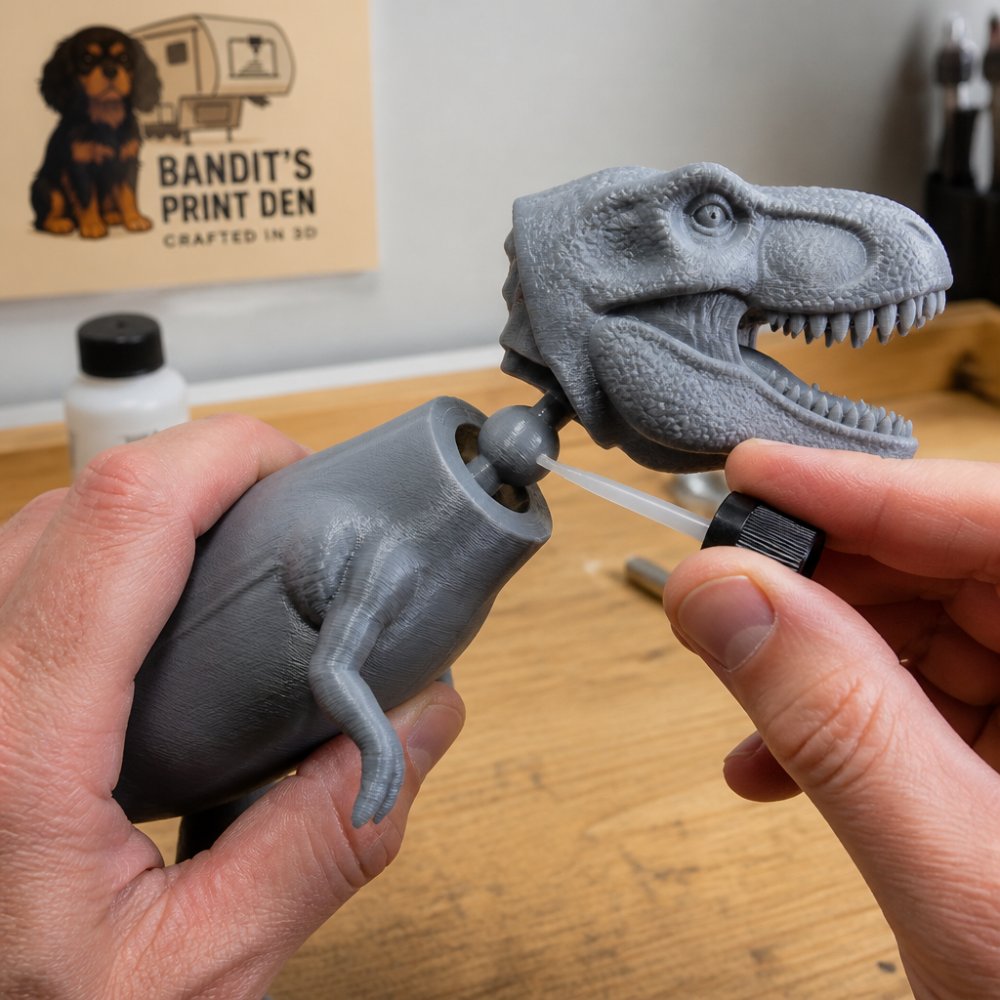
Cyanoacrylate is superglue. For ball joints, you're not gluing parts permanently, you're adding a thin layer that increases friction. Apply a small amount to the ball only, not the socket; a thin bead around the ball's equator works best.
Here's the process:
- Clean the joint with a dry cloth or compressed air
- Apply one small drop of cyanoacrylate to the ball
- Rotate the ball inside the socket five times
The glue creates a slightly thicker ball that sits tighter in the socket, so the joint feels snug without locking. One warning: too much glue locks the joint permanently. One drop is enough.
Nail Polish Coating for Friction Enhancement
Nail polish is slower than superglue but gives more control, you build up layers that increase the ball's diameter gradually. Clear polish works best because you can see what you're doing; colored works too, but visibility matters.
The steps:
- Clean the joint completely
- Paint a thin coat of nail polish onto the ball
- Let it dry fully (2-3 minutes)
Each coat adds about 0.1 millimeters to the ball's diameter; three coats usually solve a loose joint, four can make it too tight. The method is reversible, acetone removes nail polish so you can start over.
How to Tighten 3D Printed Ball Joints
Beyond the quick fixes, some methods last longer and work better for joints that see heavy use.
Using Gum Rosin for Friction Control
Gum rosin is a natural friction booster used in violin bows, gymnastics, and climbing, and it works on 3D printed joints. It comes as a solid cake; rub it directly onto the ball and the sticky residue grabs the socket and holds tight.
How to apply rosin:
- Rub the ball lightly across the rosin cake
- Rotate the ball in the socket to distribute the rosin
- Test the fit
Rosin is reversible, warm water and soap wash it off, and you can reapply anytime. The downside: it's messy, leaving residue on hands and clothes, so it's not ideal for figures you handle constantly.
Best Glue for Loose 3D Printed Joints
If you want a permanent fix, glue is the answer, but the right glue depends on your filament. PLA, PETG, and TPU behave differently under adhesives, and the wrong choice can lock a joint you wanted posable or fail within weeks. First decide whether you want a permanent fix (joint locked in one pose) or a semi-permanent fix (holds tight but can still be re-posed with effort); that determines which adhesive to reach for.
Cyanoacrylate (Superglue) on PLA, PETG, and TPU
Cyanoacrylate, superglue, bonds fast and cures brittle. On PLA it creates a strong but stiff bond that effectively locks the joint. On PETG it bonds poorly without a primer because low surface energy resists adhesion.
Use cyanoacrylate when:
- You want a fixed pose and never plan to move the joint again
- The figure is PLA and the joint is small
- You need the fix done in under a minute
Apply one small drop to the ball only, rotate the ball in the socket to spread it, and hold the pose for 60 seconds. Full cure takes about 24 hours, so avoid stress-testing the joint the same day.
Two-Part Epoxy for Semi-Permanent Tightening
Epoxy is stronger and slightly more flexible than cyanoacrylate, holding tight while allowing micro-movement so the joint stays posable with effort rather than locked solid. It works well on PLA and PETG; on TPU, its rigidity fights the filament's flex and the bond can separate at the edges, so a mechanical fix (nail polish or rosin) is usually better.
How to apply epoxy:
- Mix equal parts resin and hardener per the package ratio (typically 1:1 or 2:1)
- Apply a thin film to the ball with a toothpick
- Rotate the ball in the socket to distribute
Epoxy is not reversible. Once cured, removing it means cutting or sanding, which risks damaging the joint surfaces. Treat epoxy as a one-way decision.
Matching Adhesive to Material: A Quick Decision Path
| Filament | Best permanent fix | Best semi-permanent fix | Avoid |
|---|---|---|---|
| PLA | Cyanoacrylate | Two-part epoxy | , |
| PETG | Two-part epoxy (with surface prep) | Two-part epoxy, thin film | Cyanoacrylate without primer |
| TPU | Mechanical fix (rosin/nail polish) | Mechanical fix | Rigid epoxy |
Unsure which filament you have? Check the spool label. PLA is most common for display figures, PETG shows up in functional prints, and TPU appears in flexible parts like hands or tails.
3D Print Joint Tolerance and Design Settings
This is where you prevent loose joints in the first place. Tolerance is the gap between ball and socket: tighter means a snugger fit, looser means easier movement but looser joints.
XXL Flexi T-Rex Skeleton | 36" 3D Printed Articulated Dinosaur →
Slicing Software Tolerance Adjustments
Most slicing programs let you adjust tolerance settings. The key setting is "tolerance" or "clearance," measured in millimeters, 0.2mm is tight, 0.5mm is loose. For ball joints, start at 0.15-0.20mm for a snug fit that still moves. If your software lacks a direct setting, look for "dimensional accuracy" or "precision." Test prints help: print a small ball joint at different tolerances, find the sweet spot, and reuse it.
Fuzzy Skin Settings for Mechanical Grip
Fuzzy skin adds tiny bumps to the print surface, increasing friction without changing the ball's nominal diameter, the bumps grab the socket and hold tight. Enable "Fuzzy Skin" or "Surface Texture" and set thickness to 0.2-0.4mm. It also hides layer lines, a bonus for display figures. The trade-off: it makes the ball slightly larger, which can over-tighten a joint whose tolerance is already tight, so test before a full print.
How to Prevent Loose Joints in 3D Prints
Prevention beats fixing, but most advice is vague, "make the ball slightly bigger" isn't actionable. Prevention splits into two paths: design-time optimization (before you slice) and print-time tuning (in your slicer), with concrete starting numbers per filament, because a fix that works for PLA can fail for PETG.
Design-Time Strategies: Sizing, Taper, and Mechanical Stops
The best time to fix a loose joint is before you print.
Ball sizing. A larger ball has more friction surface.
Socket taper. A slight conical taper of roughly 1-2 degrees keeps the ball centered and adds a wedging effect that resists loosening.
Test at scale. Print the joint alone, pose it 100 times, and if it loosens, tighten tolerance by 0.05mm and reprint, faster and cheaper than reprinting full figures.
Print-Time Tuning: Tolerance, Orientation, and Fuzzy Skin by Material
Slicer settings interact with filament choice, the same 0.2mm tolerance that feels snug in PLA can feel loose in PETG, which shrinks differently and has a lower coefficient of friction.
Tolerance starting points:
- PLA: 0.15-0.20mm clearance
- PETG: 0.20-0.25mm clearance (PETG tends to print slightly undersized on holes)
- TPU: 0.25-0.30mm clearance (TPU compresses, so tighter tolerances bind)
Print orientation. Orient the ball so layer lines run perpendicular to joint movement; parallel layers are weaker and can delaminate under stress.
Fuzzy skin. Enable it on the ball only, not the socket, at 0.2-0.4mm.
Repair vs. Optimization: Choosing the Right Path
Not every loose joint needs the same response. Categorize first:
- Repair (post-print): The figure is printed and the joint is loose. Use nail polish, rosin, or glue depending on whether you want reversible or permanent.
- Optimization (pre-print): You are designing or about to slice. Adjust tolerance, orientation, and fuzzy skin before printing.
Mixing the two wastes effort: nail polish on a joint designed with 0.5mm clearance treats the symptom, while tightening tolerance to 0.2mm solves it. Conversely, reprinting a figure to fix one loose joint is overkill when a coat of nail polish would do.
Common Mistakes to Avoid
Knowing what not to do saves time and frustration.
Don't use too much glue. One drop is enough; more means a locked joint and a mess.
Don't assume the print is defective. Loose joints are normal for 3D printed articulated figures, a sign of tight tolerance, which is what you want for articulation.

Don't pose the joint aggressively right after a fix.
Don't apply fixes to the socket, apply them to the ball.
Don't ignore print orientation. A ball joint printed vertically is weaker than one printed at an angle; orientation affects layer adhesion and dimensional accuracy.
Frequently Asked Questions
What's the best way to fix loose joints on 3D printed figures?
The fastest fix is applying a thin coat of cyanoacrylate (superglue) or nail polish to the ball socket to increase friction. For a reversible approach, try gum rosin, which adds grip without permanent bonding. For long-term solutions, reprint with tighter tolerances in your slicing software or enable fuzzy skin settings. The best method depends on whether you want a permanent fix or the ability to adjust articulation later.
How do you prevent loose joints when 3D printing articulated figures?
Start with design: reduce clearance in your 3D model by 0.2-0.4mm before printing. In your slicing software, tighten tolerance settings and enable fuzzy skin if available, this adds micro-texture that increases friction coefficient. Choose PLA filament for better layer adhesion and dimensional accuracy. Print at standard speed to avoid warping. Test-print a small joint sample first to dial in the right fit before committing to a full figure.
What glue works best for loose 3D printed joints?
Cyanoacrylate (superglue) is the fastest option, apply a thin coat to the ball socket, not the ball itself, and let it cure fully. Nail polish works similarly and is reversible if you need to adjust later. For a stronger permanent bond, epoxy creates excellent layer adhesion. Avoid thick application; a thin, even coat is more effective than a heavy layer. Always test on a spare joint first to ensure the adhesive doesn't over-harden the joint.
Can you fix a 3D printed joint that's already too loose?
Yes. If the joint has already been printed too loose, you have three options: apply friction-enhancing coatings (superglue, nail polish, or gum rosin), reprint the figure with tighter tolerances, or temporarily add shims using thin plastic or tape inside the socket. For figures you want to keep, coating methods are quickest and reversible. For permanent fixes, reprinting with adjusted tolerance settings in your slicing software ensures durability for long-term display or play.
Loose joints on 3D printed figures are frustrating, but they're solvable. Quick fixes like superglue and nail polish work in minutes. Design changes prevent the problem entirely. If you're ordering custom figures from Bandit's Print Den, our team handles tolerance and orientation to give you tight joints that stay tight. Every articulated figure we print is tested for joint stability before it ships. That's why our customers report that their figures stay poseable and tight for years.
0 comments