
Table of Contents
- Choosing Your 3D Printed Fidget Toy Design
- Preparing STL Files and Print Settings for Your Fidget
- Understanding Print-in-Place Fidget Toy Design
- Printing Your 3D Printed Fidget Toy
- Removing Supports and Post-Processing
- Achieving Proper 3D Printer Tolerances for Moving Parts
- Assembling 3D-Printed Fidget Gears and Moving Mechanisms
- 3D-Printed Fidget Toy Troubleshooting and Maintenance
- Frequently Asked Questions
Last Updated: October 15, 2026
Choosing Your 3D Printed Fidget Toy Design
The first step in building a 3D printed fidget toy assembly project is picking the right design.

Start by asking yourself what kind of movement appeals to you. Do you want something that spins? Flips? Flexes? Clicks? The mechanism you choose determines which design files will work best.
Consider your printer's capabilities too. Smaller printers might struggle with intricate designs that have tight tolerances. Larger designs with simple mechanisms tend to print more reliably on entry-level equipment.
Look for designs that match your skill level. Beginner-friendly fidgets like spinners or cubes have forgiving tolerances. Advanced designs with gears or articulated limbs demand precision. Many customers start with simple 3D printed fidget designs before moving to more elaborate builds.
Popular fidget categories include:
- Spinners with ball bearings
- Infinity cubes that fold continuously
- Fidget rings and sliders
- Articulated creatures with flexible joints
- Gear-based toys with interlocking parts
Download your chosen design file from a reputable source. Thingiverse, Printables, and MyMiniFactory host thousands of free and paid designs. Read the comments section, other makers share their print settings and assembly tips there.
Preparing STL Files and Print Settings for Your Fidget
Once you've selected your design, you need to prepare the STL file for printing. This step determines print quality and assembly difficulty.
First, import your STL file into your slicing software. Common slicers include Cura, PrusaSlicer, and Simplify3D. The slicer converts your 3D model into layer-by-layer instructions your printer understands.
Check the model orientation. Print your fidget in the position that minimizes support material and maximizes surface quality on visible parts.
Set your layer height based on detail needs. Use 0.1mm layers for high-detail fidgets. Use 0.2mm for faster prints with acceptable quality. Finer layers take longer but produce smoother surfaces, important for fidgets where smooth movement matters.
Configure support settings carefully. Supports hold overhanging parts during printing but must be removed later. For print-in-place fidget toy designs, minimize supports on moving parts.
Key slicer settings to adjust:
- Infill density: 15-20% for most fidgets (100% for stress-tested designs)
- Wall thickness: 2-3 shells minimum
- Support type: Tree supports preferred
- Nozzle temperature: Check filament specs (usually 200-220°C for PLA)
- Print speed: 40-60mm/s for fidgets with tight tolerances
Export your prepared file as G-code. This is the actual instruction set your printer reads. Double-check that your export includes all the settings you configured.
Understanding Print-in-Place Fidget Toy Design
A print-in-place fidget toy design is engineered so moving parts work immediately after printing, no assembly required.
This approach sounds magical but demands respect. The gap between moving parts is typically 0.3-0.5mm. Your printer must be calibrated perfectly. Even slight over-extrusion clogs the gap. Under-extrusion leaves parts too loose.
The design itself uses clever strategies to make this work. Flexible hinges bend rather than break. Spheres sit in cups with just enough clearance to roll.
Print-in-place designs work best on well-maintained printers. If your printer hasn't been calibrated recently, do that before printing a print-in-place fidget. Check your nozzle for wear.
Material choice matters enormously. PLA works well for print-in-place designs because it shrinks slightly as it cools, actually helping parts separate.
Print speed affects tolerance performance. Slower speeds (40-50mm/s) give more precise extrusion. Faster speeds risk dimensional errors that will lock up your moving parts.
After printing, resist the urge to force movement. If parts are stuck, the issue is usually over-extrusion. Gently work the mechanism back and forth.
Printing Your 3D Printed Fidget Toy
Now comes the actual printing. This is where your preparation either pays off or teaches you something.
Start with a clean build plate. Wipe it with isopropyl alcohol to remove dust and residue.
Check your bed level. This is the most common cause of failed prints.
Load your filament and preheat your printer. Most PLA prints at 200-210°C. Check your specific filament's recommended temperature.
Start the print and watch the first layer closely. The plastic should lay down in a continuous line with slight squish.
Let the first 5-10 layers print unattended only after you're confident everything is working. Most failures happen in the first few layers.
Monitor print progress at key points:
- First 10 layers (foundation)
- Transition to moving parts (watch for support placement)
- Final layers (watch for warping at edges)
Print times vary dramatically. A simple fidget spinner might take 2-4 hours. Complex articulated designs can run 12+ hours.

Temperature stability matters. Avoid printing in drafty areas. Even a fan blowing on your printer causes warping and layer separation.
Watch for these warning signs during printing:
- Clicking or grinding sounds (filament not feeding)
- Visible gaps between layers (bed too cold or too far away)
- Plastic balling up on the nozzle (bed too close)
- Parts lifting at corners (bed not level or room too cold)
When your print finishes, let it cool completely before removing it. Hot plastic is weak and bends easily. Wait at least 30 minutes for larger prints.
Removing Supports and Post-Processing
Removing supports is tedious but essential. Supports left on your fidget will jam moving parts and look unfinished.
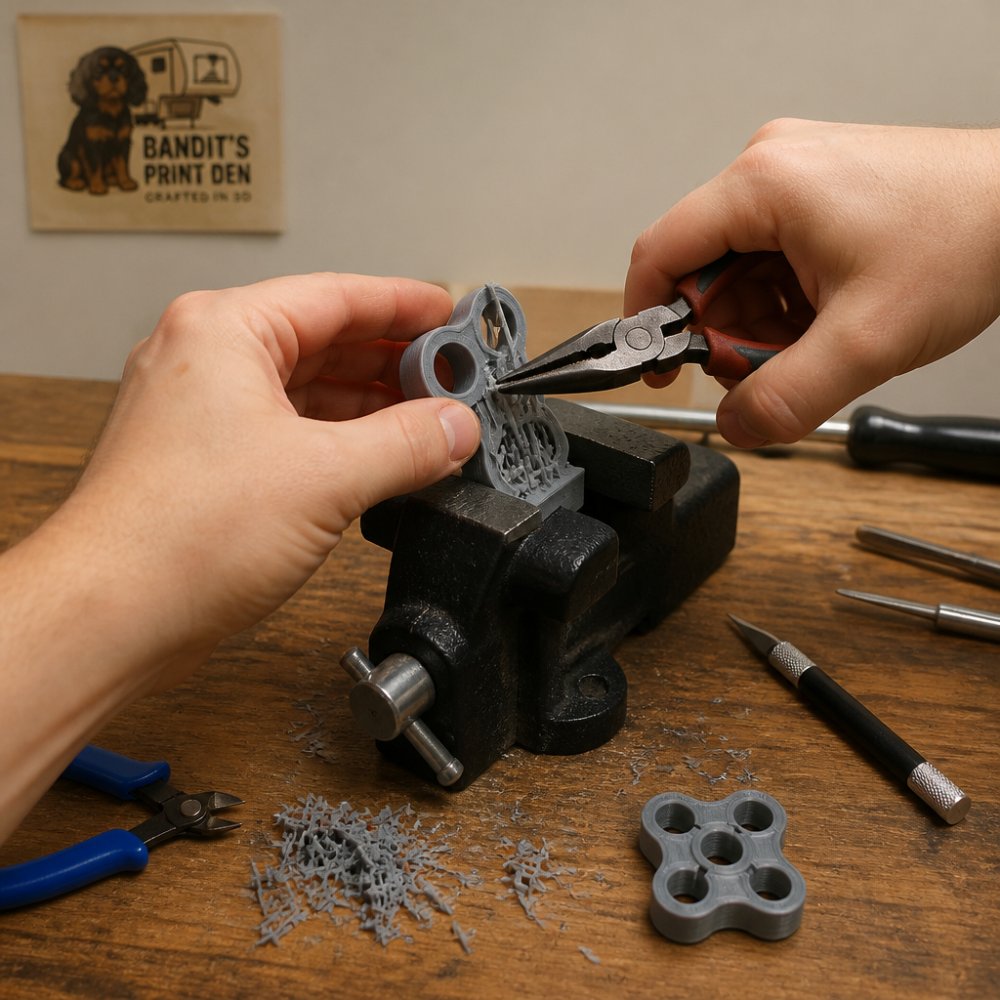
Use the right tools. Needle-nose pliers work well for breaking away support material.
Start with larger support sections. Break them away from the main piece using pliers. Work slowly, rushing risks breaking your fidget itself.
For supports attached to moving parts, be extra careful. Use a craft knife to cut away material rather than pulling with pliers.
Infinity Cube Fidget Toy | 3D Printed Pocket Fidget →
Sand rough edges after support removal. Start with 120-grit sandpaper for major imperfections. Progress to 220-grit for smoothing.
Clean your fidget thoroughly. Use warm soapy water and an old toothbrush to remove dust and loose plastic particles. Dry completely with a towel.
Test the mechanism gently at this stage. If parts are stuck, sanding might help. If they move freely, you're on track.
For enhanced appearance, consider painting or coating your fidget. Acrylic paint works fine on PLA. Seal it with clear coat if you want durability.
Achieving Proper 3D Printer Tolerances for Moving Parts
3D printer tolerances for moving parts are the gap between components that determines whether your fidget works smoothly or locks up completely. Getting this right separates successful builds from frustrating failures.
Standard FDM printer tolerance is typically 0.2-0.4mm. This means any gap you design needs to be at least this wide to actually exist in the printed part. Tighter gaps often close completely due to material extrusion variance.
Calibration is non-negotiable. Your printer must be properly tuned before attempting tight-tolerance designs. This means:
- Leveling your bed precisely
- Checking nozzle height with paper or feeler gauge
- Verifying your printer's steps-per-millimeter settings
- Testing extrusion width with a simple single-line print
Print a tolerance test object first. These are small pieces with various gap sizes. Print one and measure the actual gaps. This tells you what tolerance your specific printer can reliably achieve.
Factors that affect tolerance:
- Filament diameter variation (±0.03mm is typical)
- Nozzle wear (worn nozzles extrude thicker lines)
- Bed temperature (affects plastic flow)
- Print speed (slower is more precise)
- Ambient temperature (cold rooms cause shrinkage)
Design your fidget with tolerance in mind. If your design specifies 0.3mm gaps and your printer typically produces 0.15mm gaps, your fidget won't work. Either adjust your design or improve your printer calibration.
For print-in-place mechanisms, use proven designs from experienced makers. They've already solved the tolerance puzzle for your printer type. Attempting to design custom mechanisms requires deep understanding of your printer's specific behavior.
Assembling 3D-Printed Fidget Gears and Moving Mechanisms
Most fidgets don't require assembly, they work as-printed. But some designs involve multiple pieces that snap together or gear assemblies that need careful alignment.
Check your design instructions first. Reputable designs include assembly notes. Follow them exactly. They're written by people who've already worked through the tricky parts.
For snap-joint assemblies, align pieces carefully before pressing them together. Snap joints work through interference fit, slight compression holds parts together. Apply steady pressure rather than tapping with a hammer.
3D-printed fidget gears need precise alignment. Mesh gears carefully so teeth engage smoothly. If gears bind, check for:
- Misalignment (gears not parallel)
- Over-extrusion (teeth too thick)
- Debris caught between teeth
Clean gear teeth thoroughly before assembly. Even tiny plastic particles jam gears. Use compressed air or a brush to clear debris.
For fidgets with ball bearings or moving spheres, ensure the track is clean and smooth. Sand any rough spots. Test movement before final assembly.
Some designs use friction fits to hold pieces together. These rely on plastic-to-plastic contact creating enough grip. Don't force these, excessive force cracks plastic.
Test all mechanisms gently after assembly. Smooth, quiet operation means success. Grinding, clicking, or sticking means something is wrong. Disassemble and troubleshoot rather than forcing movement.
3D-Printed Fidget Toy Troubleshooting and Maintenance
Your fidget isn't working right? Here's how to diagnose and fix common issues.
Stuck moving parts usually mean over-extrusion or misalignment. Gently work the mechanism back and forth. Don't force it.
Rough or sticky movement suggests surface roughness. Sand the moving parts with 220-grit sandpaper. Light sanding removes layer lines and smooths plastic.
Cracked or broken parts mean your fidget experienced stress beyond its design limits. PLA is strong but brittle. Avoid dropping or flexing excessively.
Warped or bent pieces usually happened during printing. Your bed wasn't level or the room was too cold. Check bed leveling and reprint.
Loose or wobbly parts indicate under-extrusion or loose tolerances. This is usually a printer calibration issue.
Maintenance keeps your fidget working smoothly:
- Clean regularly with warm soapy water
- Avoid extreme temperatures (PLA softens above 60°C)
- Don't expose to direct sunlight for extended periods (UV degrades PLA)
- Store in a dry place (PLA absorbs moisture)
- Test movement occasionally (catches issues early)
For fidgets with ball bearings, clean bearings occasionally. Use compressed air to blow out dust.
If your fidget stops working after months of use, the issue is usually worn parts or accumulated dust. Clean thoroughly first.
Quality fidgets deliver months of satisfying use. Most issues come down to printer calibration or design choice.
Building a 3D printed fidget toy from scratch teaches you real skills, from design selection to printer calibration to assembly. Bandit's Print Den offers pre-designed fidgets like the Infinity Cube Fidget Toy and SquishSpin 2" Textured Sensory Fidget Spinner if you'd rather skip the printing process and jump straight to enjoying high-quality, precision-printed fidgets delivered to your door.
Frequently Asked Questions
What tools do I need to assemble a 3D printed fidget toy?
Most 3D printed fidget toys require minimal tools. You'll need needle-nose pliers or tweezers to remove support material, a hobby knife or craft knife for cleanup, fine-grit sandpaper (220-400 grit) to smooth rough edges, and potentially a small file for precision adjustments. For toys with snap joints or friction-fit parts, no adhesive is needed, the design handles assembly. Keep a small work surface clear for assembly, and wear safety glasses when removing supports to protect your eyes from small plastic fragments.
How do you make a print-in-place fidget toy move freely?
Print-in-place fidget toys are designed to move without assembly or glue. The key is proper slicer setup and printer calibration. Use a slicer that supports gap settings (typically 0.2-0.4 mm between moving parts), and ensure your printer is properly leveled and calibrated. After printing, gently work the moving parts by hand, flex gears, rotate joints, and slide sections repeatedly to break in friction. If parts stick, carefully use a hobby knife to clear any excess plastic from gaps, or lightly sand contact surfaces. Avoid forcing parts, as this can crack the print.
Why are the moving parts on my 3D printed fidget toy stuck?
Stuck parts usually result from inadequate gap settings in your slicer, printer calibration issues, or excess plastic in joints. Check your slicer's horizontal expansion setting, if it's set too low or zero, parts print too tight. Increase the gap between moving components to 0.3-0.5 mm. If the toy is already printed, carefully clean joint gaps with a hobby knife or small file to remove excess plastic. Gently work the parts back and forth to break in friction. For severe cases, lightly sand contact surfaces with fine-grit sandpaper. Never force stuck parts, as you risk cracking the print.
Which filament works best for a durable 3D printed fidget toy?
PLA is the most popular choice for fidget toys because it's easy to print, produces smooth surfaces, and offers good color variety. It works well for most designs, though it can become brittle over time with heavy use. PETG offers better durability and flexibility, making it ideal for toys with frequent bending or high stress. TPU (flexible filament) is excellent for toys requiring flex without breaking. For fidget toys that will see regular handling, PLA with proper print settings (0.2 mm layer height, 210-220°C nozzle temp) provides a good balance of quality, durability, and ease of printing.
0 comments