
Table of Contents
- Resin vs Filament Printing: Core Differences
- Print Quality: Resolution, Detail, and Surface Finish
- Best 3D Printing Method for Miniatures
- Resin vs FDM Print Strength and Durability
- Resin vs Filament Cost: Total Investment Breakdown
- Resin 3D Printer Safety and Cleanup Requirements
- Speed, Build Volume, and Material Options
- Which Method Matches Your Project
- Frequently Asked Questions
Last Updated: October 12, 2026
Resin vs Filament Printing: Core Differences
Choosing between resin vs filament printing comes down to what you're actually trying to make. Both technologies create 3D objects, but they work in completely different ways and deliver vastly different results. The choice between them shapes everything: your timeline, your budget, the detail you'll see, and whether your finished piece will flex or shatter.
Resin printing uses liquid photopolymer that hardens when exposed to ultraviolet light. Filament printing (also called FDM or Fused Deposition Modeling) melts plastic and deposits it layer by layer. That fundamental difference cascades into every other consideration.
How resin printing works
Resin printing starts with a vat of liquid photopolymer resin. A UV light source cures the resin one thin layer at a time, building your object from the bottom up.
The process is fast and produces exceptional detail because the layer height is tiny, often 25 to 50 microns. That translates to smooth surfaces and crisp fine details.
The tradeoff? Uncured resin is messy. You'll need to wash your prints in isopropyl alcohol to remove excess resin, then cure them under UV light to fully harden them.
How filament printing works
Filament printing heats plastic to its melting point and extrudes it through a nozzle. The nozzle moves across a build platform, depositing thin lines of plastic that cool and solidify.
The process is slower than resin printing, and layer heights are larger, typically 100 to 200 microns. That means visible layer lines on your finished print. You'll see horizontal striations unless you sand and finish the piece afterward.
But filament printing is forgiving. You load plastic, start the print, and walk away. No messy cleanup. No chemical handling.
Print Quality: Resolution, Detail, and Surface Finish
Resin printing wins this category decisively. The layer height is smaller, the light source is more precise, and the curing process creates smoother surfaces.
Filament printing produces visible layer lines. Depending on your layer height setting, those striations might be subtle or obvious. You can sand and prime to hide them, but it takes work.
The detail difference matters most at small scales. A resin-printed 28mm fantasy miniature will have sharper details than a filament-printed one at the same size. For larger objects, the gap narrows. A filament-printed chess piece or decorative box looks fine without post-processing.
Best 3D Printing Method for Miniatures
For miniatures and articulated figures, resin printing is the clear choice. The fine detail, smooth surfaces, and small layer height make it ideal for anything under 100mm where you want visible features to look crisp and professional.
Filament printing can work for larger miniatures or display pieces, but you're fighting against layer lines and the coarser resolution. If you're printing something collectible or gift-worthy, the kind of thing someone displays on a desk, resin gives you a finished product that looks premium without extra finishing work.
For many detailed collectibles, the detail justifies the extra cleanup steps.
Resin vs FDM Print Strength and Durability
Here's where filament printing flips the script. Resin prints are brittle. They'll crack or shatter if dropped or flexed. That's not a flaw; it's just the material.
Filament prints are tough. If you need a print that survives being handled, played with, or dropped, a fidget toy, a functional part, a desk buddy that gets tossed around, filament is the material.
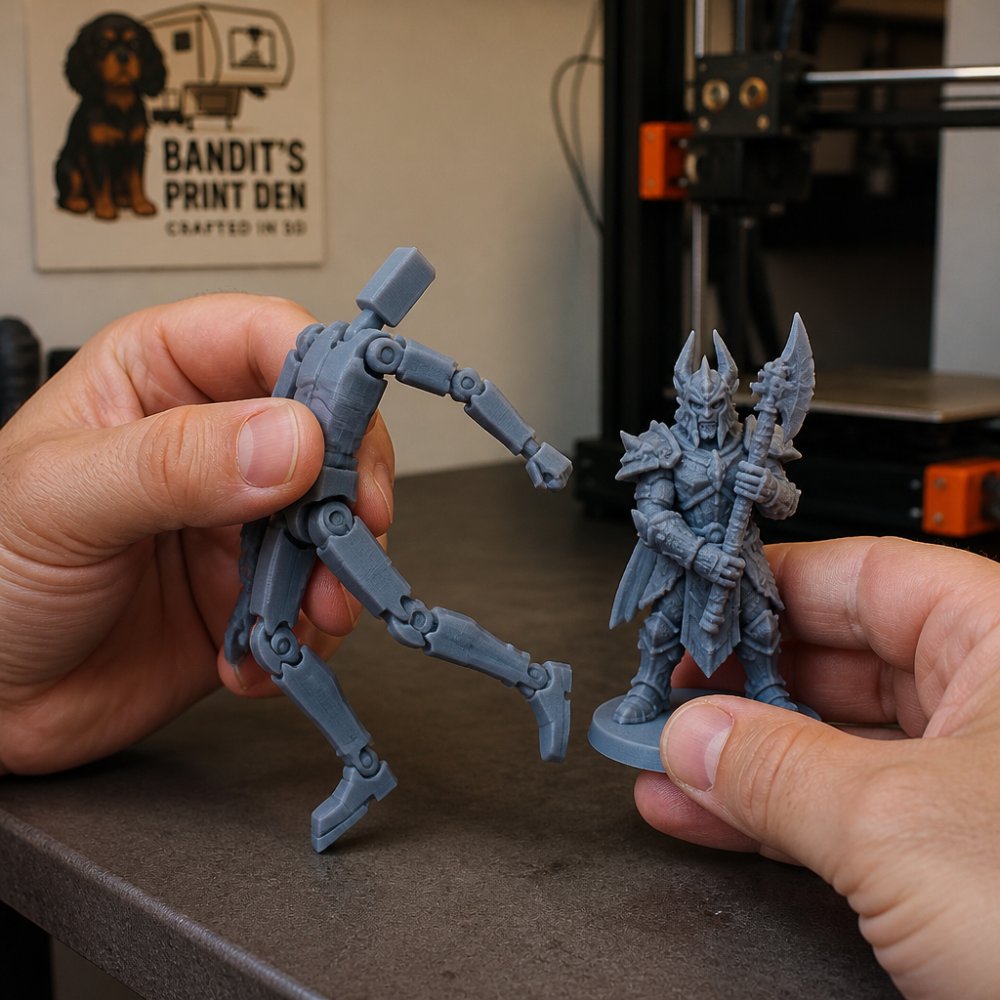
The durability difference also matters for articulated figures. A resin-printed articulated figure with moving joints is fragile; the joints might snap if bent too far.
Resin vs Filament Cost: Total Investment Breakdown
Printer price is the least useful number in this comparison. A filament printer and a resin printer can end up costing the same over a year once you count what each one actually consumes. Here is the full picture, line by line.
Upfront hardware
Entry-level filament printers commonly land in a certain range. Resin printers of comparable build quality usually start at a certain price for smaller build volumes and climb for larger or higher-resolution units. Neither number includes the extras you will buy in the first month.
Consumables per print
- Filament: sold by the kilogram. Common PLA runs roughly $15-$25/kg, PETG $20-$30/kg, TPU $25-$40/kg. A typical 100 g articulated figure costs a few dollars in plastic.
- Resin: sold by the liter. Standard photopolymer typically runs $25-$45/L, tough or flexible formulations $40-$80/L. A 30 g miniature uses a small fraction of a liter, but you also lose resin to the vat, drips, and failed prints.
Per gram, resin is usually more expensive. Per finished small part, the gap narrows because resin prints are lighter and hollowed more aggressively.
The hidden line items
This is where the total cost of ownership diverges, and where most comparisons stop short:
- Resin washing and curing: isopropyl alcohol (often $20-$40 per gallon in bulk), a wash-and-cure station ($80-$200), nitrile gloves, respirator cartridges, and a dedicated waste container for contaminated IPA.
- Resin disposal: cured resin can generally go in household trash in most jurisdictions, but liquid resin and resin-contaminated IPA cannot go down the drain. Check your local household hazardous waste rules; some areas require drop-off.
- Filament finishing: sandpaper, primer, filler, and occasionally a heat gun. Mostly one-time purchases.
- Failed prints: resin failures waste resin, IPA, gloves, and time; filament failures waste plastic but rarely anything else. A common pattern is that beginners burn through more resin in month one than they expect.
- Replacement parts: resin printers consume LCD screens (often $30-$80, replaced every few hundred hours of use) and FEP film ($15-$30, replaced every few prints to every few dozen prints depending on care). Filament printers consume nozzles ($5-$15), occasionally PTFE tubing, and the build surface.
Time as a cost
Resin's faster per-layer speed means more finished pieces per week if you are selling. But the wash-cure-clean cycle adds 20-40 minutes of hands-on time per batch. Filament printing is slower on the machine but often closer to "start and walk away." If your time is worth money, count it.
EPA household hazardous waste guidance
Resin 3D Printer Safety and Cleanup Requirements
Resin safety is not a single rule; it is a set of habits that depend on which resin you are using and how much you print. Here is what actually matters in practice.
Uncured resin
Liquid photopolymer is a skin and eye irritant, and repeated exposure can trigger sensitization, meaning a reaction that gets worse each time rather than better. The practical rules:
- Gloves: nitrile, not latex. Latex breaks down faster against resin. Change them whenever they get contaminated.
- Eye protection: safety glasses or a face shield when pouring, scraping, or handling the vat.
- Skin contact: wash immediately with soap and water, not IPA. IPA on skin drives resin deeper into pores.
- Ventilation: print in a space with active airflow, an open window with a fan, a garage, or an enclosure vented outdoors. A bathroom with no window is a poor choice.
Isopropyl alcohol
IPA is flammable and its vapors are heavier than air, so they pool in low spaces. Store it in a sealed container away from ignition sources, and never wash prints next to a water heater, furnace, or anything with a pilot light. Used IPA becomes contaminated with uncured resin and should be treated as hazardous waste, not poured down a drain.
Curing
A UV curing station with an enclosed chamber is the standard approach. The UV light inside is not a hazard when the lid is closed. Curing fully, usually several minutes per side depending on the resin and station, matters for both safety and final material properties; under-cured prints remain slightly tacky and can still leach irritants.
Waste handling
- Cured resin scraps and supports: generally acceptable in household trash in most areas, but confirm with your local waste authority.
- Liquid resin and contaminated IPA: household hazardous waste drop-off in most jurisdictions. Never the sink, never the storm drain.
- Empty resin bottles: rinse and recycle where accepted; otherwise trash.
Filament safety by comparison
The main hazards with filament printing are the hot nozzle and hot bed (burns, not chemistry) and ultrafine particle emissions during printing. PLA emits relatively little; ABS and some specialty filaments emit more and benefit from enclosure and ventilation. No gloves, no IPA, no curing step. The trade-off is that filament printing has its own waste stream, failed prints, purge lines, and support material, but it is ordinary plastic, not a reactive chemical.
OSHA hazard communication guidance
Speed, Build Volume, and Material Options
Resin printing is faster per layer, but build volume is smaller on most consumer machines. You're printing intricate details quickly, but you're limited to smaller objects.
Filament printing has larger build volumes on comparable machines. You can print bigger objects in a single go.
Material options favor filament. PLA is the standard, easy to print, widely available, comes in dozens of colors. PETG is stronger and more durable. TPU is flexible.
Resin has fewer material options, but the choices available are specialized. Standard resin is what you'll use most often.
Which Method Matches Your Project
Start with what you're making. Miniatures, articulated figures, jewelry, and anything requiring fine detail? Resin. The detail and surface quality are worth the cleanup.
Functional parts, large objects, items that need durability, or fidget toys? Filament. The toughness and ease of use outweigh the visible layer lines.
Uncertain which direction to go? Think about these questions:
- Will this print be handled frequently, or does it sit on display? (Handled → filament; display → resin)
- Do you need fine detail, or is surface finish less critical? (Fine detail → resin; functional → filament)
- How much time can you dedicate to post-processing? (Minimal time → resin; willing to sand and finish → either)
- What's your budget for equipment and materials? (Tight → filament; flexible → resin)
The choice isn't about which technology is "better." It's about matching the tool to the job. Resin printing excels at what it does. Filament printing excels at what it does. Pick the one that solves your specific problem.
When you're ready to bring your vision to life, Bandit's Print Den can help. Our team has the experience to recommend the right method for your project and the craftsmanship to execute it with precision. Learn more about our custom printing services and let's create something extraordinary together.
Frequently Asked Questions
Which is better for detailed 3D prints, resin or filament?
Resin printing typically wins for fine detail. SLA and LCD resin systems achieve layer heights as low as 0.025 mm, capturing sharp edges and intricate features that filament's standard 0.1-0.2 mm layers cannot match. Filament printing excels at larger, functional parts but produces visible layer lines on curved surfaces. For miniatures and articulated figures where surface quality matters, resin delivers smoother finishes with minimal post-processing.
Is FDM cheaper than resin?
FDM printing is generally cheaper upfront and per-print. Filament and resin have varying costs per kilogram and liter, respectively. However, total cost depends on your project volume, material waste, and post-processing time. A single small resin print may cost less than an equivalent filament print because resin uses less material. For high-volume production, filament's lower per-unit cost and faster print speeds can offset initial equipment differences.
What are the main differences between resin and filament 3D printing?
Resin printing uses photopolymer resin cured by UV light, producing high-resolution prints with smooth surfaces and fine detail. Filament printing extrudes melted thermoplastic (PLA, ABS, PETG, TPU) layer by layer, offering greater material variety and durability. Resin requires careful handling, ventilation, and cleanup; filament is safer and more user-friendly. Resin excels at detail and miniatures; filament suits functional parts, large builds, and flexible designs. Build times, material costs, and maintenance differ significantly between the two.
Is resin 3D printing harder to clean and maintain?
Yes, resin printing demands more care. Uncured resin is toxic and requires protective equipment, proper ventilation, and careful disposal. Post-processing involves washing prints in isopropyl alcohol and curing under UV light. Failed prints and spills need hazardous-waste protocols. Filament printing is simpler: remove supports, sand if needed, and print again. For hobbyists and office environments, filament's lower maintenance and safety profile make it more practical. Resin suits dedicated workshops with proper ventilation and cleanup infrastructure.
0 comments